What is AI Automation? A Strategic Guide for Enterprise Leaders
May 25, 2026 By Team AI Automation Agency 360
Enterprise operations often slow down in small, hidden places you can’t always see first. Approvals stuck in inboxes, repeated data reconciliation, disconnected systems, and manual document reviews. A delay may seem minor, but at scale, these gaps start affecting your business KPIs, including operating costs, cycle times, response rates, SLA performance, and compliance exposure.
That is why, in 2026, enterprise AI automation has become an operational priority. The enterprise AI market is expected to grow from $114.87 billion in 2026 to $273.08 billion by 2031, reflecting how quickly intelligent automation is becoming part of core business systems.
Enterprise AI automation brings machine learning, LLMs, workflow automation, and AI agents together to reduce manual handoffs, improve exception handling, and give your teams real-time context for faster decisions.
Drawing on our first-hand experience in building enterprise AI systems, this guide explains how enterprise AI automation works, where it creates value, and what to consider before production.
TL;DR
- AI automation is an intelligence layer on top of your existing RPA, orchestration, and integration stack, not a replacement for it.
- The real question at your scale is portfolio and sequencing: what to automate, under what governance, and through which sourcing model (build, buy, or partner).
- Most enterprises will run RPA, AI automation, and agentic AI in parallel. Agentic is production-ready in bounded domains like service triage and IT ops, still immature in open-ended workflows.
- Well-scoped business-unit pilots return measurable value in 6 to 9 months. Enterprise-wide operating leverage shows up at 18 to 36 months through a Center of Excellence model.
- As AI regulation matures, model governance, auditability, human oversight, and data controls are becoming core requirements rather than optional safeguards.
What is Enterprise AI Automation?
Enterprise AI automation uses machine learning, large language models, AI agents, workflow orchestration, and integration tools to automate complex business processes across your departments and systems. It helps your teams handle work that depends on context, judgment, unstructured data, or multi-step decision-making.
This is where it differs from traditional automation. RPA bots and rule-based workflows are useful for predictable, repetitive tasks, but they struggle when processes involve changing inputs, unclear requests, or decisions that need context.
Enterprise AI automation adds an intelligence layer to your existing systems, so you can handle that complexity at scale. It can interpret information, classify requests, summarize documents, detect exceptions, recommend actions, and route work to the right person or system across thousands of transactions, tickets, documents, or approvals.
Four core capabilities usually shape enterprise AI automation programs:
- Machine learning (ML): ML models learn from historical data to identify patterns, predict outcomes, and improve decision accuracy over time. In enterprise, they support fraud detection, demand forecasting, risk scoring, customer segmentation, and anomaly detection.
- Natural language processing (NLP): LLMs and NLP models help systems understand human language across emails, contracts, reports, tickets, and transcripts to automate data extraction, summarize key points, route requests, and flag compliance risks.
- Predictive analytics: Uses historical data, statistical modeling, and machine learning to identify hidden patterns in past data to forecast future outcomes. Enterprises leverage it to anticipate upcoming behaviors, reduce operational risks, and optimize opportunities.
- Robotic process automation (RPA): RPA bots execute repetitive, rule-based tasks such as data entry, form processing, and file transfers quickly and without error, freeing human employees to focus on more strategic work.
Quick glossary
| Term | Definition |
| Robotic Process Automation (RPA) | Software bots that execute rule-based tasks across applications |
| Machine Learning (ML) | Models that learn patterns from data and make predictions on new inputs |
| Natural Language Processing (NLP) | Technology that reads, interprets, and generates human language |
| Predictive Analytics | Statistical and machine learning methods are used to forecast outcomes from historical data |
| Generative AI | Models that produce new content based on learned patterns |
| Intelligent Document Processing (IDP) | AI-powered extraction and classification of data from unstructured documents |
| AI Agent | A system, typically built on foundation models, that plans and executes multi-step tasks across tools |
| Agentic AI | AI systems capable of autonomous planning, decision-making, and execution across workflows or systems |
AI Automation vs. Traditional Automation
While both traditional and enterprise AI automation share the same goal of reducing your manual work. However, they both operate at different levels of scale and complexity.
Traditional automation is built for structured, predictable tasks. It follows predefined rules to move data, trigger approvals, send notifications, generate reports, or complete repetitive steps across systems.
AI automation is built for workflows that require more context. It interprets information, recognizes patterns, detects exceptions, and supports decisions. So it’s more suitable for enterprise processes that involve documents, emails, service tickets, compliance reviews, customer requests, and other inputs that do not always follow the same format.
The difference becomes clear when a process changes. A traditional workflow may stop when the input is incomplete, the format is different, or the request does not match a fixed rule. AI automation can classify the issue, summarize the context, recommend the next step, or route the work to the right team with supporting information.
For enterprise leaders, traditional automation improves efficiency in repeatable processes. AI automation extends that value across complex, cross-functional workflows where speed, consistency, visibility, and control directly affect business KPIs.
| Dimension | Traditional Automation (RPA) | AI Automation |
| Input type | Structured only | Structured and unstructured |
| Decision-making | Rule-based | Learned and contextual |
| Adaptability | Script updates | Retraining and feedback |
| Scale | Linear in rule count | Improves with data volume |
| Best for | Repeatable, rule-based work | Judgment, variability |
| Maintenance | Developer-dependent | MLOps, data science |
| Governance | Process controls | Model governance, explainability |
How to think about your existing RPA estate
AI automation should be viewed as an extension of that estate rather than a replacement for it. Your RPA bots still have value where the work is structured, stable, and high-volume. They can move data, update records, trigger workflows, and complete predictable tasks at a lower cost and with strong consistency.
The opportunity is to add AI where RPA reaches its limits. You can augment existing bots with AI, so they handle exceptions that they currently escalate to employees. You can add AI decisioning to steps that require judgment, such as classifying a request, reviewing a document, or assessing risk. You can also use agentic orchestration to coordinate multiple bots, systems, and approvals into one connected workflow.
A useful rule is simple: use RPA for repeatable execution and AI for context-heavy work. Most enterprise workflows need both. The design question is where AI should sit in the pipeline so your existing automation estate becomes more adaptive, scalable, and valuable.
How AI Automation Works: The 5-Stage Process
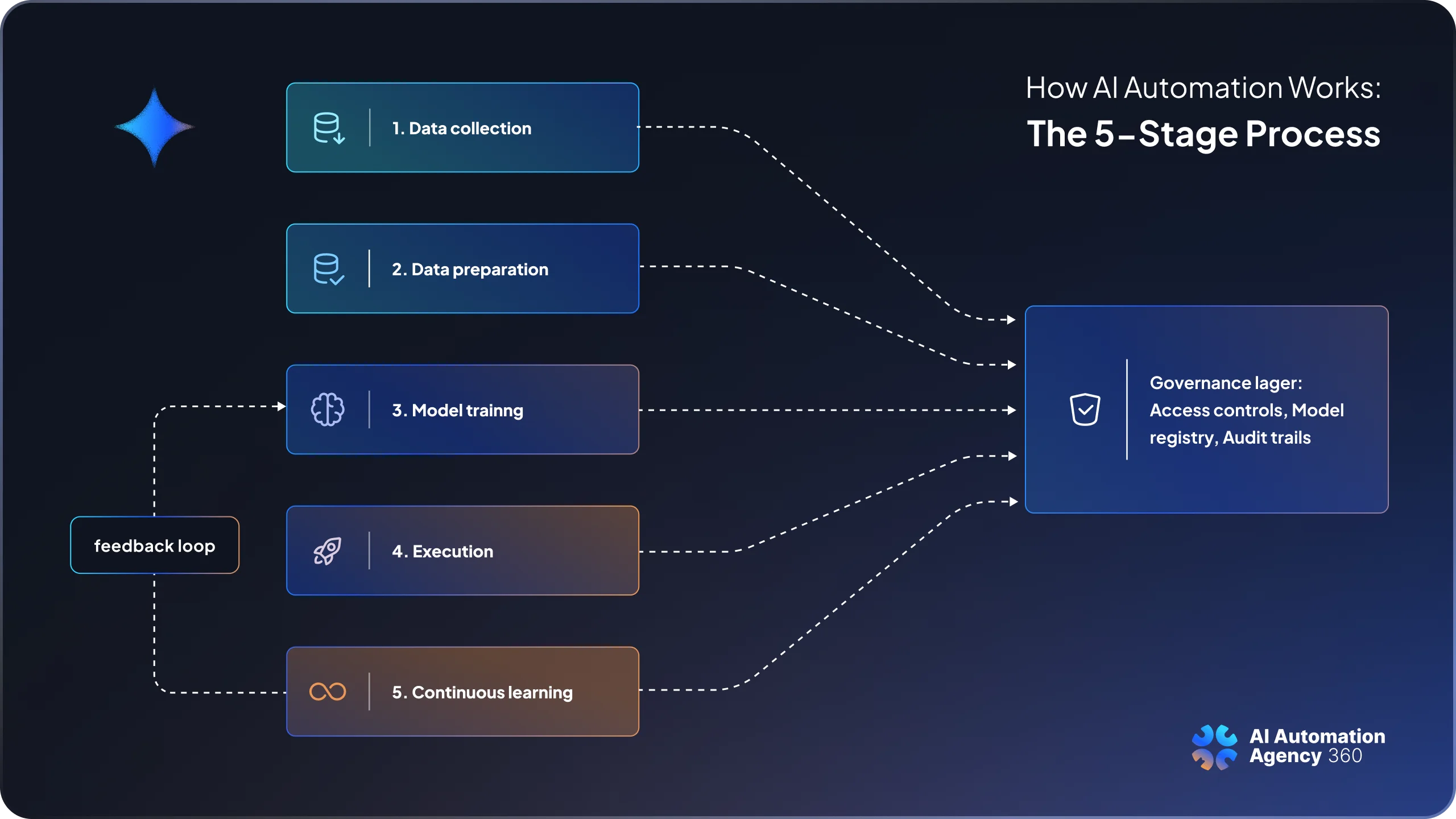
Enterprise AI automation works by turning business inputs into governed, automated action. However, the process goes beyond simply adding AI to a task. A reliable enterprise system needs access controls, audit trails, exception handling, human approval points, model monitoring, and integration with your existing tools.
Most AI automation systems move through five core stages, explained below, where governance runs across all five, so automation stays secure, explainable, compliant, and aligned with business KPIs.
Stage 1: Data collection
AI automation starts by connecting the systems where enterprise work already happens. That can be your existing ERPs, CRMs, data warehouses, document repositories, email inboxes, invoices, etc.
However, sometimes, the challenge is rarely just access. At enterprise scale, data collection also depends on governance. GDPR, HIPAA, data residency rules, role-based access, and internal security policies.
For example, a global insurer may need claims data processed in-region, while a healthcare provider may need patient data masked before it enters an AI workflow.
Stage 2: Data preparation
Once data is collected, it has to be cleaned, normalized, labeled, and structured for automation. Because the quality of AI outputs is as good as the data it’s trained on, and real-world data is often messy, incomplete, or unstructured. Surprisingly, 87% of AI projects never make it to production, primarily due to inadequate data governance and poor-quality training data.
So in this stage, your teams deduplicate CRM records, standardize ERP fields, map invoice and purchase order data, and prepare unstructured inputs such as PDFs, emails, scanned forms, contracts, and call transcripts.
Stage 3: Model training
At this stage, the enterprise decides which AI approach fits their workflow. Some use cases need machine learning models trained on historical data, such as fraud detection, demand forecasting, or risk scoring. Others need large language models to summarize documents, extract clauses, classify requests, or support knowledge retrieval.
Once you select a model, model training requires feeding your prepared data into the selected algorithm so that it learns patterns and relationships. This stage also includes choosing whether to fine-tune an existing model, connect it to approved internal data through RAG, or build a custom model for a highly specific use case.
Stage 4: Execution
At this stage, your AI system starts running inside the actual workflow. The model receives live inputs, such as an invoice, support ticket, contract, approval request, or customer query, and produces an action or recommendation. That output is then passed to the workflow layer, where APIs, RPA bots, orchestration tools, ERPs, CRMs, ticketing systems, or approval systems move the process forward.
For enterprise teams, execution also means making the system reliable in production. The workflow must meet latency targets, handle large transaction volumes, follow role-based access rules, log every action, and escalate exceptions when human review is needed.
Stage 5: Continuous learning
After deployment, your AI automation system needs to be monitored and improved because real-world data changes over time. New document formats appear, customer behavior shifts, policies change, and model accuracy can decline. This is known as model drift.
At this stage, teams use human-in-the-loop reviews, performance monitoring, error analysis, drift detection, and scheduled retraining to keep the system accurate and useful. MLOps practices also help manage model versions, testing, rollback, and governance, so AI automation remains reliable and competitive.
Enterprise Use Cases Across the Business
In 2026, most enterprise AI automation investment is concentrated in five high-impact functions. These are areas where teams already have large process volumes, complex systems, and measurable KPIs. AI automation adds value by handling unstructured data, improving exception management, and supporting decisions that traditional automation cannot manage reliably.
Finance: close-cycle acceleration and controls
Month-end close, reconciliations, expense reviews, intercompany transactions, and SOX controls all depend on accurate supporting data. AI automation helps finance teams classify invoices, contracts, receipts, purchase orders, and GL entries, then flag mismatches, missing approvals, duplicate payments, or policy deviations.
Instead of adding headcount to manage close pressure, finance leaders can use AI automation to increase throughput, reduce manual review, and move toward faster close cycles with stronger controls.
Customer operations: contact center at scale
AI automation improves contact center performance by understanding customer intent, retrieving relevant knowledge in real time, supporting agents during live interactions, and summarizing calls automatically after resolution. It also updates CRM records, classifies tickets, detects sentiment, and monitors quality across every interaction instead of relying on small manual samples.
The outcome is lower average handle time, stronger first-contact resolution, more consistent service quality, and better compliance coverage across all digital channels. McKinsey cites one consultant who noted that using AI agents in contact centers can cut cost per call by around 50% while also improving customer satisfaction scores.
Supply chain: demand signal to planning
With AI, supply chain teams move from static planning cycles to more responsive decision-making. Demand forecasting includes signals such as sales history, pricing changes, weather patterns, supplier performance, etc.
AI automation can also flag inventory exceptions, monitor supplier risk, recommend replenishment actions, and surface disruption signals earlier. This improves working capital efficiency, service-level consistency, and response speed when demand or supply conditions change.
Risk, compliance, and legal
AI reviews contracts clause by clause against a playbook, extracts obligations, and routes exceptions. It can also monitor regulatory updates, classify risk events, and support KYC, AML, and fraud workflows with pattern detection that static rules often miss.
For enterprise leaders, the value is broader compliance coverage at a lower unit cost, with better auditability, faster reviews, and fewer manual blind spots.
HR and people operations
HR teams can manage high-volume, policy-heavy processes across geographies. They benefit from faster time-to-hire, better workforce planning, more consistent employee support, and self-service capacity that shared services teams cannot scale alone. Leveraging AI automation supports resume screening with bias monitoring, answers employee policy questions, and generates workforce analytics around attrition risk, skills gaps, hiring demand, and internal mobility.
Sales and Marketing
For marketing teams, AI can analyze campaign performance, identify high-value audience segments, generate content variations, and route qualified leads to sales faster. For sales leaders, it improves forecast accuracy, reduces manual CRM work, and gives reps better context before every interaction. Both departments benefit from stronger pipeline visibility, faster lead generation, higher conversion rates, and better alignment between sales, marketing, and customer success.
Benefits of Enterprise AI Automation
At enterprise scale, the value of AI automation goes beyond saving a few hours per employee. The stronger business case is tied to operating leverage, margin improvement, stronger controls, faster cycle times, and better workforce allocation. These benefits connect directly to the metrics leadership teams already track.
- Operating leverage: AI helps your organization handle higher process volumes without increasing headcount at the same rate. In areas such as accounts payable, claims processing, service operations, and tier-one support, automation improves unit economics as volume grows.
- Margin improvement: In document-heavy and judgment-based workflows, AI can reduce the cost per transaction by automating review, classification, routing, and exception handling. Over time, this can improve cost-to-serve, cost-per-transaction, and customer acquisition economics as adoption expands.
- Stronger controls and compliance: AI automation can move controls from sample-based checks to broader process coverage. This helps your teams identify policy deviations, missing approvals, duplicate records, and compliance risks more consistently, reducing audit gaps across high-volume operations.
- Shorter cycle times: Processes such as financial close, quote-to-cash, claims handling, employee onboarding, and customer support can move faster when AI reduces manual review and handoffs. The impact often reaches working capital, revenue realization, SLA performance, and customer experience.
- Better workforce allocation: AI shifts employee time from repetitive execution to analysis, review, exception handling, and process improvement. This delivers the most value when operating models, roles, and approval flows are redesigned alongside automation.
AI Automation vs. Agentic AI: What's the Difference?
AI automation and agentic AI are closely related, but they do different jobs in an enterprise automation strategy. A useful way to understand the difference is to look at the automation stack in three layers. Agentic systems reason about a goal, break it into steps, call tools, observe results, and adjust. A service agent that receives a refund request, checks order history, verifies eligibility, processes the refund, and updates the case record without human handoff is an agentic workflow.
| Layer | What it does | Autonomy | Best fit |
| RPA | Executes defined rule-based tasks | None, fully scripted | Structured, stable, high-volume work |
| AI automation | Applies learned judgment to workflow steps | Bounded, humans set rules and review outputs | Unstructured inputs, exceptions, and classification |
| Agentic AI | Plans and executes multi-step goals across tools | High, within guardrails | Scoped workflows with clear success criteria |
RPA is the execution layer. It works well when the task is predictable, such as moving data between SAP and Salesforce or updating a record after approval. AI automation adds judgment to those workflows. It can read an invoice, classify a support ticket, summarize a contract, detect an exception, or recommend the next action before the workflow continues.
Agentic AI goes a step further. Instead of completing one intelligent task inside a workflow, an AI agent can work toward a defined goal across multiple tools. For example, a service agent could receive a refund request, check order history, verify policy eligibility, process the refund, update the CRM case, and escalate only if the request falls outside approved rules. Getting that behavior to run reliably in production is where developing AI agents becomes real engineering rather than a demo.
This is why agentic AI is gaining attention. Gartner predicts that 40% of enterprise applications will include task-specific AI agents by the end of 2026, up from less than 5% in 2025. Even so, most production use today is strongest in bounded areas such as service triage, IT operations, code review, research assistance, and internal workflow support.
Build, Buy, or Partner? The Enterprise AI Automation Sourcing Decision
For enterprise leaders, the sourcing decision comes down to three questions: Is AI automation a source of competitive advantage for your business? Do you already have the data, engineering, and MLOps capability to support it? How quickly do you need measurable results?
In practice, most enterprises do not choose only one path. They often buy platforms for common automation needs, build selectively where the workflow is proprietary, and partner when they need strategy, implementation speed, or specialist capability.
The clearest rule is simple: buy what is standard, build what differentiates, and partner where speed and expertise reduce execution risk.
Build: Develop AI Automation In-House
Building in-house makes sense when the use case is highly specific to your business and gives you a clear competitive edge. This may include proprietary pricing models, risk scoring systems, customer intelligence workflows, supply chain optimization, or internal decision engines built on data only your organization owns.
The benefit is long-term control. You keep the IP, shape the architecture, and avoid being limited by a vendor roadmap. The trade-off is time and cost. You need data scientists, ML engineers, platform engineers, security teams, domain experts, and mature MLOps. This works best when a central AI platform team supports business-unit teams that own specific use cases.
Buy: Deploy Enterprise AI Automation Platforms
Buy when the process is common, requirements are clear, and speed matters more than customization. Platforms such as UiPath, Automation Anywhere, Pega, Microsoft Power Platform, and Salesforce can support RPA, workflow automation, service operations, CRM workflows, and low-code orchestration.
You get faster deployment, vendor support, built-in governance, and more predictable TCO. The trade-off is vendor lock-in and limited differentiation. For many enterprises, buying covers broad automation needs while custom AI is reserved for strategic workflows.
Partner: Work With a Specialist AI Automation Firm
Partner when you need use case discovery, architecture, implementation speed, and production delivery without building a full internal team first. This is common in the first 12 to 24 months, when leaders are still defining data readiness, governance, integrations, and operating models.
The right partner will help you identify high-value workflows, design the architecture, connect AI with your existing systems, build prototypes, implement governance, and move the solution into production.
Best Enterprise AI Automation Tools in 2026
At enterprise scale, “tools” usually mean platforms, AI infrastructure, and orchestration layers, not simple team-level automation apps. Tools like Zapier, Make, and n8n can support individual productivity or lightweight workflows, but enterprise AI automation requires stronger governance, security, integration depth, scalability, and lifecycle management. Most evaluations fall into four categories.
Enterprise automation platforms (RPA + AI + orchestration)
This category includes UiPath, Automation Anywhere, Blue Prism (now part of SS&C), Pega, and Microsoft Power Automate. These platforms combine RPA, AI, and human-in-the-loop workflows within a single orchestration layer, supported by mature governance and large partner ecosystems.
They are best suited for organizations scaling across functions and extending existing RPA estates. The limitation is low differentiation, since competitors can adopt the same platforms. Deployment is SaaS, on-premises, or hybrid.
AI-native platforms and copilots
(Copilot across Microsoft 365 and Dynamics), ServiceNow and Workday. The primary advantage is tight integration with core business workflows and data, reducing implementation friction.
They work best when automation stays within existing ERP, CRM, or ITSM environments. The limitation is system boundary lock-in, with cross-platform workflows often requiring additional orchestration. Deployment is typically SaaS and cloud-native.
Hyperscaler AI infrastructure
This layer is provided by cloud vendors such as AWS (Bedrock, SageMaker), Microsoft Azure AI, and Google Cloud Vertex AI. The strength is scalability and deep integration with cloud data environments, enabling custom AI systems close to enterprise data.
They suit organizations already standardized on a cloud provider and building tailored solutions. The limitation is that they provide infrastructure only, requiring enterprises to design and operate the automation layer. Deployment is cloud-native.
LLM and foundation model providers
This category includes providers such as OpenAI, Anthropic, Google (Gemini), Meta (Llama), and the broader open-source ecosystem. It forms the core intelligence layer used across all other platform types.
Selection depends on model performance, cost, data governance, and regional requirements rather than features. Most enterprises now use multiple models. Deployment can be SaaS or self-hosted, depending on control needs.
What to Look For When Evaluating Enterprise AI Automation Tools
Choosing an enterprise AI automation tool is less about the feature list and more about how well the platform will perform inside your real operating environment. The right tool should integrate with your systems, meet your governance standards, support scale, and give your teams enough control to trust the outputs.
Use these criteria to evaluate your shortlist.
- Enterprise Architecture fit: Check whether the platform connects with the systems you actually run, such as SAP, Oracle, Salesforce, data warehouses, and industry-specific platforms. Prioritize native connectors, full API coverage, event triggers, SSO, SAML, and SCIM.
- Compliance and certifications: Confirm the platform meets your security, data residency, audit, and industry compliance needs, such as HIPAA, GDPR, FedRAMP, etc., before shortlisting it. Ask for current certifications, audit reports, encryption details, and access control documentation.
- Model governance and explainability: Look for model registries, version control, audit logs, drift monitoring, bias checks, and inference-level explainability. Your risk, legal, and compliance teams should be able to trace what the model did, why it acted, and who approved or overrode the output.
- Total cost of ownership: Compare three-year cost, not seat price. Include licenses, implementation, integration, data preparation, infrastructure, MLOps, vendor support, internal staffing, training, and change management.
- Time-to-value at scale: Ask reference customers how long it took to launch the first workflow and the tenth. A large gap usually means the platform works for pilots but becomes slow or expensive when scaled across business units.
- Vendor trajectory and ecosystem: Evaluate financial stability, product roadmap, R&D investment, partner ecosystem, implementation talent, and enterprise customer base. AI automation is a multi-year program, so vendor momentum matters.
- Human-in-the-loop and oversight tooling: Make sure the tool supports review queues, approval workflows, confidence scoring, escalation paths, and manual override. These features are essential for workflows involving payments, compliance, customer decisions, HR, legal, or regulated data.
Enterprise AI Automation Challenges and How to Address Them
Enterprise AI automation is easy to prove in a controlled pilot and much harder to scale across live operations. Once the system touches customer data, core workflows, approvals, compliance rules, and legacy platforms, the risks become operational, financial, and regulatory. Leaders need to know where these programs usually stall before budgets, vendors, and workflows are locked in.
Pilot purgatory and the ROI timeline
Payback can stretch across 18 to 36 months when teams commit to platforms before validating integration effort, adoption needs, and measurable business outcomes. The way forward is a portfolio approach: prioritize high-value workflows, fund projects in stages, tie continuation to KPI milestones, and avoid single-vendor dependency for critical capabilities.
Legacy system integration
Enterprise AI automation has to work with the systems your business already runs, not the other way around. When those systems lack modern APIs, integration can take more effort than the AI model itself. Before selecting a platform, run an integration readiness audit, map read/write access requirements, and prioritize vendors with mature native connectors. Teams that succeed at integrating AI into the systems they already run often avoid the gap between a delayed pilot and a production system.
Data Quality, Residency, and Sovereignty
AI automation depends on clean, accessible, and relevant data. If customer records, invoices, tickets, or documents are incomplete or inconsistent, model outputs become unreliable. Enterprises also need to consider where data is stored and processed, especially under GDPR, sector-specific rules, and national data sovereignty laws.
Model Governance, Bias, and Explainability
Production models can drift as business conditions, customer behavior, and process data change. Bias can also appear in decisions related to hiring, lending, pricing, service eligibility, or risk scoring. Gartner predicts that by 2027, 60% of organizations will fail to realize the anticipated value of their AI use cases due to incohesive data governance frameworks. Without explainability, teams struggle to improve the model or defend its decisions.
Shadow AI
Shadow AI grows when employees use unsanctioned tools to move faster than approved systems allow. That creates data leakage, access control, compliance, and audit risks. IBM’s 2025 Cost of a Data Breach Report found that 63% of organizations lack formal AI governance policies, and 97% of organizations with an AI-related security incident lacked proper AI access controls.
That’s why you need approved AI tools that match your business speed, have well-defined rules for data use, role-based access controls, usage monitoring, and training.
Workforce Transformation and Change Management
AI automation evolves rapidly by changing roles, skills, responsibilities, and career paths across functions. If your employees only hear about automation after decisions are made, resistance and slow adoption are likely. Each major initiative needs a named executive sponsor, clear communication, retraining plans, and honest guidance on how specific roles will change.
Regulatory exposure (EU AI Act and sector-specific oversight)
AI regulation is becoming a serious enterprise risk, especially for organizations in finance, healthcare, the public sector, and cross-border operations. The EU AI Act, GDPR, and expanding U.S. sector-specific guidance affect how AI systems are documented, monitored, and governed.
The best way to reduce this risk is to treat compliance as part of the AI automation design, not a final approval step. Define data access rules early, document model behavior, maintain decision logs, involve legal and risk teams, and keep human oversight in place for high-impact workflows.
How to Adopt Enterprise AI Automation
Enterprise AI automation does not scale through scattered pilots or tool-led experimentation. It scales when you treat it as an operating model change, with clear business priorities, governed data access, production-ready integration, executive ownership, and measurable value targets. The goal is to move from “where can we use AI?” to a disciplined roadmap of workflows that can improve margin, speed, risk control, and customer experience at enterprise scale.
Step 1: Set enterprise ambition and prioritize the portfolio
Tie AI automation to priorities your board already recognizes: margin improvement, revenue growth, risk reduction, operational resilience, and competitive parity. Prioritize use cases by value-at-stake and implementation feasibility. A bottom-up list of disconnected ideas creates a patchwork that rarely scales. Start with a ranked portfolio of six to ten use cases owned at the executive committee level.
If your team needs help turning scattered AI ideas into a prioritized roadmap, our AI automation strategy and consultation services can help you identify the highest-value use cases and define a practical path to implementation!
Step 2: Assess data, infrastructure, and capability readiness
Run a formal readiness assessment before committing to platforms. It covers data accessibility, integration architecture, MLOps capability, and governance maturity, treated as a 30 to 60-day diagnostic with clear deliverables.
The output should be a clear capability gap analysis. What you can use now, what must be improved, and what should be built, bought, or supported by a partner before the first use case reaches production.
Step 3: Run business-unit-scope pilots with executive sponsors
Scope pilots at the business-unit level, such as one function, geography, or product line. Each pilot should have a named executive sponsor, defined success metrics, agreed data access, and a clear path to production. This scale is large enough to test the operating model, integration effort, governance process, and adoption barriers, not just the underlying AI technology.
Step 4: Establish governance and decision rights early
Stand up a committee with business, IT, risk, legal, and HR representation. Put decision rights on use case approval, data use, vendor selection, and risk acceptance in writing. Formalize this before the second or third pilot. Retrofitting governance after an incident costs materially more than building it in.
Step 5: Design human-in-the-loop and oversight mechanisms
Decide where people approve, review, override, or audit AI outputs. Define escalation paths, confidence thresholds, kill-switch conditions, and audit requirements before workflows go live.
This is highly critical for regulated industries like finance, healthcare, HR, and legal. Oversight tooling should be selected alongside execution tooling, because governance needs to work inside daily operations.
Step 6: Monitor, measure, and iterate
Once AI automation is in production, track performance against your business outcomes, not model accuracy alone. The right KPIs should be cost per transaction, cycle time, SLA performance, exception rate, first-contact resolution, close duration, recovery rate, or compliance coverage.
At the same time, monitor model behavior. Track accuracy, drift, false positives, escalation rates, override patterns, and user feedback so the system stays reliable as data, policies, and business conditions change. Review the portfolio quarterly at the governance committee level.
Step 7: Scale Through a Center of Excellence With Continuous Measurement
Once pilots show repeatable value, move to a Center of Excellence model. The central team should own platforms, standards, governance, reusable patterns, vendor management, capability building, and portfolio measurement. Business units should own use cases, adoption, and process outcomes.
At mid-market scale, this may require 10 to 30 FTE. At enterprise scale, it can exceed 50. The CoE should track business KPIs, model performance, drift, adoption, and quarterly portfolio value. Underperforming initiatives should be paused or retired as part of normal governance, not treated as failure.
The Future of Enterprise AI Automation
Over the next two to three years, enterprise AI automation will move deeper into daily operations. The focus will shift from proving isolated use cases to building governed, scalable systems that improve cost, speed, risk control, and workforce productivity.
- Hyperautomation matures: Enterprises will bring RPA, workflow orchestration, AI models, and agentic systems into one connected architecture. Teams running separate automation programs will start consolidating platforms, standards, and governance.
- Agentic AI moves from pilot to production in bounded domains: AI agents will create value in bounded areas such as service triage, IT operations, code review, research, and internal support. Broader, open-ended enterprise automation will still need careful scope, guardrails, and human oversight.
- Model governance becomes an operational discipline: Model registries, audit trails, access controls, drift monitoring, and explainability will move from compliance paperwork into everyday platform requirements. As regulation matures, governance will become part of the AI automation budget, not an afterthought.
- Custom vertical models gain ground over general-purpose LLMs: In regulated or accuracy-sensitive workflows, domain-trained models may outperform general-purpose LLMs on cost, accuracy, and control. Enterprises with proprietary data and clear use cases will have more reason to invest in purpose-built models.
- AI workforce impact becomes a board-level topic: AI automation will reshape knowledge-worker roles, approval flows, and operating models. Leaders will need clear plans for reskilling, role redesign, adoption, and accountability so automation improves performance without creating organizational friction.
Your Next Step in AI Automation!
AI automation can create meaningful value across finance, operations, customer service, compliance, HR, and revenue teams, but only when it starts with the right use cases. Before you commit to a platform or launch another pilot, you need clarity on where automation will reduce cost, improve cycle times, strengthen controls, or remove the manual bottlenecks affecting your KPIs.
Our AI automation agency helps enterprise teams turn that early uncertainty into a practical roadmap. We assess your workflows, data readiness, integration needs, governance requirements, and existing automation stack to identify where AI can create the strongest business impact.
Schedule a free consultation with us to prioritize your highest-value AI automation opportunities and build a clear path from strategy to production!
FAQs About Enterprise AI Automation
How does AI automation fit with our existing RPA estate?
AI automation extends your RPA estate. RPA still works well for structured, repetitive tasks. AI adds value where bots struggle: exceptions, unstructured inputs, and judgment-heavy steps. You can use AI to handle escalations, add decisioning on top of existing bots, or connect multiple bots into more complete end-to-end workflows.
Build, buy, or partner — which makes sense for us?
It depends on your goals, capability, and timeline. Build when the workflow is proprietary and gives you a competitive advantage. Buy when the use case is standard and speed matters. Partner when you need strategy, architecture, and implementation support without building a full internal team first. Most enterprise programs use all three.
What governance structure do we need before we scale?
You need clear ownership before AI automation expands beyond early pilots. At minimum, this includes an AI governance committee with business, IT, legal, risk, security, and HR input. You also need policies for use case approval, data handling, vendor selection, audit logs, model monitoring, and human review. Governance should be built early, not added after scale.
What's the total cost of ownership for enterprise AI automation?
Licensing is only one part of the cost. The larger investment usually comes from implementation, integration, data preparation, MLOps, governance, training, and change management. Instead of comparing tools by seat price, ask for a three-year TCO view that includes platform costs, delivery work, internal resources, and ongoing support.
How should we structure a Center of Excellence?
A hub-and-spoke model usually works best. The central team owns standards, governance, reusable architecture, vendor management, and best practices. Business units own the use cases, process knowledge, and adoption. This keeps control centralized while allowing automation to scale across finance, operations, customer service, HR, and compliance.
How long until we see ROI at enterprise scale?
Focused pilots can show early value within 6 to 9 months, especially in high-volume workflows with clear KPIs. Enterprise-wide impact usually takes 18 to 36 months because scaling requires governance, integrations, data readiness, adoption, and operating model changes. The hard part is rarely the pilot; it is turning isolated wins into repeatable enterprise capability.